

QR codes are a great way to promote a small business and provide information to customers in an instant. This quick guide outlines the basics and gives step-by-step details on how you can create a QR code for your business
What are QR codes?
QR (Quick Response) codes are small, pixelated black and white squares, similar to barcodes. The QR code can be scanned using a camera built into a mobile phone to reveal a message, view information, or direct people to a website.
Steve O'Connor is an interaction designer at Sigma UK.
"A QR code is a two-dimensional barcode," he explains. "It contains information both horizontally and vertically within its pattern. QR codes can be used to hold any kind of written data and transfer it instantly. It could be a message, a link to a video, a coupon or special offer, co-ordinates of a particular location - the list is growing bigger all the time!"
What are QR codes used for?
QR codes are often used as a bridge between offline and online locations. For instance, putting one on a restaurant menu or in a shop window can help drive real-world customers to your website (for this to be most effective, send them to a special page designed for mobile phones). Most businesses use QR codes as a marketing tool.
O'Connor says there are lots of other innovative ways to use QR codes too: "You can have a QR code as your ticket for an event. It could contain a utility bill or be used for taking and making payments - all securely of course."
In fact, QR codes are endlessly versatile. You can even use them to take payments from customers.
You can store quite a lot of information in a single QR code. "Although in principle you can store up to 3kbs of data, the practical capacity when used with mobile phone cameras is around 400 characters," explains O'Connor "This ensures the codes are not too dense and can be scanned easily."
How to create QR codes
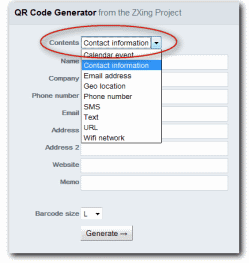
There are lots of different ways to create QR codes. We've chosen the QR Code Generator from the ZXing Project, because it's nice and easy to use.
- Go to the QR Code Generator web page.
- Use the Contents box to choose what sort of information you want your QR code to contain.
- Fill in the details you want your QR code to hold.
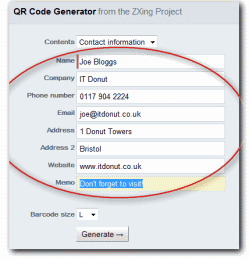
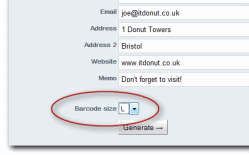
Although you can enter as much or as little information as you like, including less information will result in a QR code which is easier to scan. - Choose the Barcode size you want.
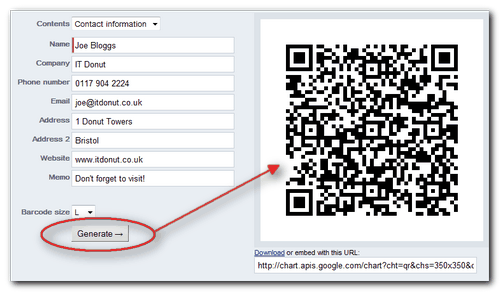
You can experiment with this to get the right size for your own application. We recommend leaving 'Encoding','Error correction' and 'Character encoding' on their default selections. - Click Generate and after a few seconds your QR code will appear on the screen: If you're not sure what size to use, choose large. You can always make the QR code smaller later on, if you need to.
 (You can snap it with your mobile phone at this point to check it works.)
 - Save your QR code. To save your QR code as a file on your computer, move your mouse pointer over it and click the right mouse button. A menu will open - click the relevant option with the left mouse button, depending on your web browser:
 In Microsoft Internet Explorer, click Save picture as
- In Firefox, Safari or Google Chrome, click Save image as
A standard Save as... window will open, allowing you to choose a location for the file on your computer.
Once you've saved the QR code, you can use it wherever you like: business cards, posters, adverts, your website, signs - it's up to you!


